Both pie charts and bar graphs are for categorical variables. A categorical variable means that the variable only takes certain isolated/discrete values. Typically, we can use a not-too-long table to list all possible values for the variable. With a continuous variable that can take a large (e.g., infinite) number of values, it may not be informative to use pie charts or bar graphs.
A box plot or boxplot (also known as a box-and-whisker diagram or plot) is a convenient way of graphically displaying summaries of a variable. Often times, the five-number summary is used: the smallest observation, lower quartile (Q1), median (Q2), upper quartile (Q3), and largest observation.
Using a boxplot, we can describe data in a graphical way that readily conveys information about the location, spread, skewness, and longtailedness of a sample. Some advantages of boxplots include:
A boxplot displays information about the observations in the tails, such as potential outliers.
Boxplots can be displayed side-by-side to compare the distribution of several variables.
A boxplot is easy to construct.
A boxplot is easily understood by users of statistics.
A simple boxplot
A boxplot can be generated for a variable simply using the function boxplot(). The plot shows the extreme of the lower whisker, the lower hinge, the median, the upper hinge and the extreme of the upper whisker. It also shows any data points which lie beyond the extremes of the whiskers. For example, the code below generates a boxplot for the age variable in the ACTIVE study.
Values plotted in a boxplot (five numbers and outliers)
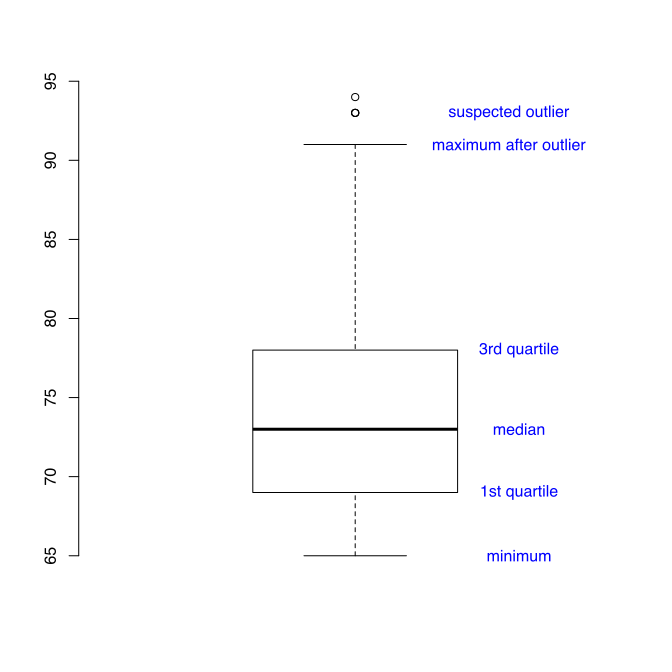
In a boxplot, the following 5 values are plotted, median, 1st quartile, and 3rd quartile from all data as well as minimum and maximum after removing suspected outliers. The suspected outliers are determined in the following way. First, the interquartile range (IQR) is calculated as the difference between the 3rd quartile and the 1st quartile. Then, if a value is smaller than the inner/lower fence (= 1st quartile - 1.5*IQR) or greater than the outer/upper fence (= 3rd quartile + 1.5*IQR), it is identified as a suspected outlier. For some boxplot, the fence is plotted if outliers are identified.
One boxplot with annotated information is shown below.
Compare multiple groups
Multiple boxplots can be put together for group comparison. To do so, a formula is often used as input, such as y ~ group, where y is a numeric vector of data values to be split into groups according to the grouping variable group. For example, the code below is used to compare the distribution of age for booster training group and control group in the ACTIVE study.
It can be useful to include the confidence interval for the median for comparison purpose in boxplot by setting the notch option to be TRUE to draw a notch in each side of the boxes. If the notches of two plots do not overlap, this is ‘strong evidence’ that the two medians differ (Chambers et al, 1983, p. 62). The confidence interval is calculated as $median \mp 1.58 IQR/\sqrt{n}$.
For the current example, one question can be asked is: If on average, the booster training group had a higher cognitive ability than the control group, was that due to the training or age differences?
> attach(active)
>
> boxplot(age~booster, main='Boxplot of Age', ylab='Age (in years)',
+         xlab='Booster training', names=c('No','Yes'))
>
> boxplot(age~booster, main='Boxplot of Age with Notches',
+         ylab='Age (in years)', xlab='Booster training',
+         names=c('No','Yes'), notch=T)
>
To cite the book, use:
Zhang, Z. & Wang, L. (2017-2026). Advanced statistics using R. Granger, IN: ISDSA Press. https://doi.org/10.35566/advstats. ISBN: 978-1-946728-01-2. To take the full advantage of the book such as running analysis within your web browser, please subscribe.